An SSD failure takes down my homelab production server
My Proxmox host kept all of its VM storage on a single spare 256GB SSD. Ten VMs sat on one consumer drive, with no RAID and no backups. The drive started failing writes, the LVM thin pool holding every VM disk went partial, and the entire lab was down for over 12 hours. I salvaged the files that mattered by mounting the QEMU disk images by hand. Some data was permanently lost; nothing mission critical.
Impact
- Down: all ten VMs on the host, including LAN DNS, the Traefik reverse proxy, GitLab, and the CI runner.
- Duration: at least 12 hours from the first write errors to services back up.
- Data loss: yes, permanent. Most files were recovered from the disk images; what could not be recovered was not mission critical.
Trigger
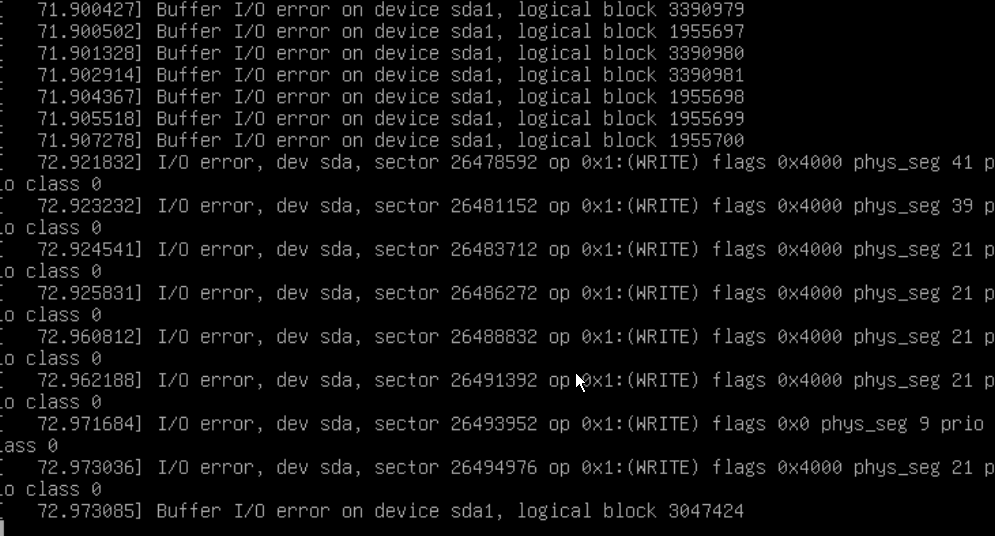
Under load, the SSD began failing writes. Inside the guests the kernel
logged I/O error, dev sda, op 0x1:(WRITE) and long runs of
Buffer I/O error on device sda1. Every failing operation was a
write. Reads were still served from cache, so services stayed partially
responsive while nothing was actually being persisted.
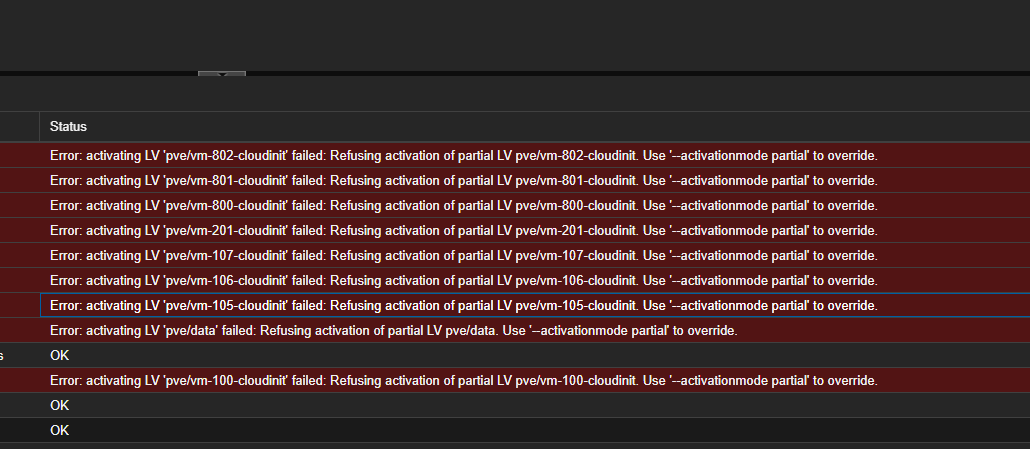
Then the drive dropped out entirely. The physical volume went missing from the
volume group, and every VM start failed with
Refusing activation of partial LV, including
pve/data itself. With the thin pool unavailable, no VM disk could
be activated.
Root cause
The pve volume group, including the thin pool pve/data
that backed every VM disk, lived on a single 256GB SSD with no redundancy.
When that one drive failed, every VM on the host lost its disk.
Contributing factors
- No disk-health alerting. The first signal was services misbehaving, not a warning about the drive.
- Reads still worked. Services served cached reads and looked half alive while no writes were being saved.
- LAN DNS lived on the same host. The outage took down name resolution for the whole network, not just the lab.
Detection
There was no disk-health alerting, so the first signal was services misbehaving. I opened the console of the VM hosting DNS and the Traefik reverse proxy and found the kernel logging a continuous stream of I/O errors, with the same sectors failing repeatedly.
Rebooting did not help. The VM dropped to the initramfs shell with
fsck exited with status code 4,
UNEXPECTED INCONSISTENCY: RUN fsck MANUALLY. A manual fsck
repaired the inode counts and reported FILE SYSTEM WAS MODIFIED,
but the write errors resumed as soon as the system was back up. Once the host
itself was restarted, the thin pool never came back.
Resolution
The pool could no longer run as storage, so recovery meant salvaging files.
- Pulled the VM disk images off the dying drive and attached them read-only on a healthy machine.
- Mounted the guest filesystems inside the images by hand and copied out the compose stacks, configs, and application data.
- Rebuilt the VMs from the cloud-init template and redeployed the services on fresh storage.
Most of the files I needed were retrieved this way. Some were not, and that data is gone for good. Nothing in that category was mission critical.
What went well
- The guest kernel logs pointed straight at dying storage. Every failure was a write.
- Mounting the QEMU images by hand recovered most of what mattered, even after LVM refused to activate anything.
- Nothing mission critical was lost.
What went wrong
- The host was set up on a spare 256GB SSD with no plan for it failing. That one device was a single point of failure for ten VMs.
- No backups of any VM. Recovery meant pulling files off a dying disk instead of a restore.
Follow-ups
- Replace the dead SSD and rebuild the node.
- Run production homelab storage on a RAID1 mirror.
- Back up VMs on a schedule: weekly for everything, daily for the critical ones.